
 1 / 4
1 / 4
RXPRE521 Silicone LED Facial Care Mask | Rebeatec
SKU: rxpre521
The Rebeatec RXPRE521 silicone LED facial care mask features 88 four-in-one LED packages, four wavelength sources, and five selectable modes. A connected handheld controller with an LCD display provides mode and timer controls, with 10/20/30-minute settings. The rechargeable 2600 mAh battery supports USB Type-C charging. Wholesale and customization inquiries welcome.
- Wavelengths: 525 nm to 850 nm Near-Infrared Light.
- - Flexible silicone mask with ABS components
- - 88 four-in-one LED packages
- - Four wavelength sources and five selectable modes
- - Separate connected handheld controller
- - LCD display and two physical control buttons
- - 10 / 20 / 30-minute timer options
- - 3.7 V / 2600 mAh rechargeable battery
- - USB Type-C charging with 5 V / 1 A input
- - Approximately four-hour charging time
- - B2B wholesale and customization inquiries welcome
INTERESTED IN THIS PRODUCT?
Flexible LED Facial Care for Your Product Range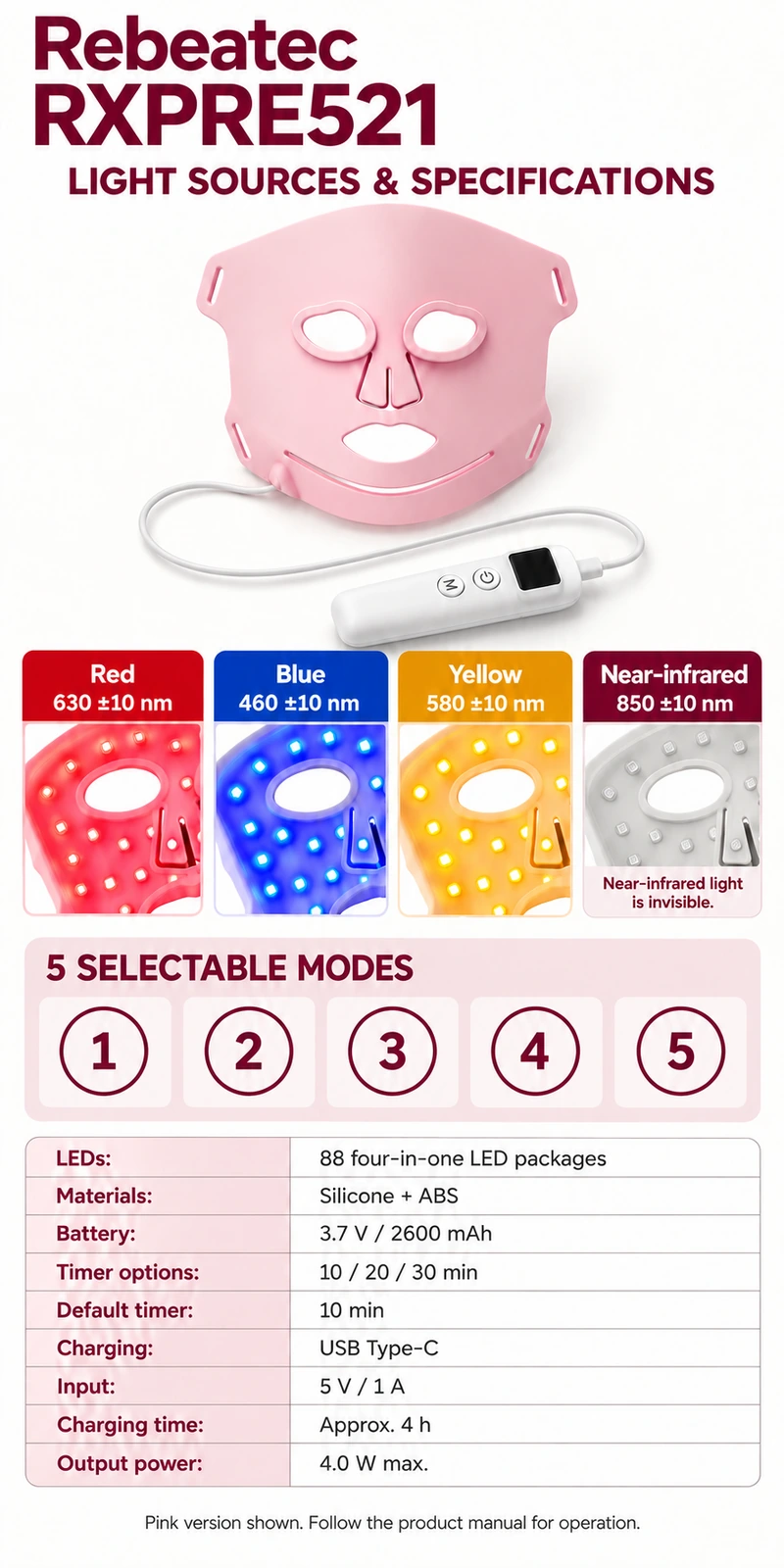
Brand: Rebeatec
Model: RXPRE521
Product Type: Silicone LED facial care mask
Materials: Silicone + ABS
LED Configuration: 88 four-in-one LED packages
Wavelength Sources: 4
Selectable Modes: 5
Red Wavelength: 630 ±10 nm
Blue Wavelength: 460 ±10 nm
Yellow Wavelength: 580 ±10 nm
Near-Infrared Wavelength: 850 ±10 nm
Controller: Connected handheld controller with LCD display
Physical Buttons: 2
Timer Options: 10 / 20 / 30 minutes
Default Timer: 10 minutes
Battery: 3.7 V / 2600 mAh lithium battery
Charging Port: USB Type-C
Charging Input: 5 V / 1 A
Charging Time: Approximately 4 hours
Output Power: 4.0 W maximum
Operating Temperature: 0–40°C
Storage Temperature: -10–50°C
Follow the RXPRE521 product manual for charging, connecting the mask and controller, fitting the securing straps, and selecting settings. The supplied specification states that holding the power button for approximately 1.5 seconds switches the device on or off. The default start setting is red light with a 10-minute timer. Select the available mode and a 10, 20, or 30-minute timer according to the manual. Follow the supplied instructions for session duration, usage frequency, cleaning, and storage.
Refer to the RXPRE521 product manual for light sensitivity screening and any required pre-use test. Follow the manufacturer's stated test method and observation period before first use.